> For the complete documentation index, see [llms.txt](https://docs.shark.top/llms.txt). Markdown versions of documentation pages are available by appending `.md` to page URLs; this page is available as [Markdown](https://docs.shark.top/gtav/exit/menu/nightfall/use.md).
# 黄昏使用教程
 ## **注册**
[**点击注册**](https://nfcheats.com/login)
**如图操作:**
{% hint style="danger" %} **注册的时候不能有中文跟特殊字符,不然会注册/注入不了**
{% endhint %}
## **注册**
[**点击注册**](https://nfcheats.com/login)
**如图操作:**
{% hint style="danger" %} **注册的时候不能有中文跟特殊字符,不然会注册/注入不了**
{% endhint %}


 **注册后登录**
 **登录后如图操作:**\
**复制激活码 点击激活**
**登录后如图操作:**\
**复制激活码 点击激活**
 ## 下载
{% tabs %}
{% tab title="下载安装器:" %}
{% embed url="" %}
**如果菜单更新了,但是安装器还没更新,那么你可以只是官方注入器或者等安装器更新**
{% endembed %}
## 下载
{% tabs %}
{% tab title="下载安装器:" %}
{% embed url="" %}
**如果菜单更新了,但是安装器还没更新,那么你可以只是官方注入器或者等安装器更新**
{% endembed %}
 {% endtab %}
{% tab title="官网下载注入器" %}
{% endtab %}
{% tab title="官网下载注入器" %}
 **黄昏官网内点击 ****`Download`**** 下载官方注入器**
{% endtab %}
{% endtabs %}
{% hint style="info" %} **下载**** ****`安装器`**** ****或者**** ****`注入器`****,两者*****二选一*****即可,别两个都下载了 还来问我怎么用**
{% endhint %}
## 准备工作
{% tabs %}
{% tab title="注入前准备工作" %}
> **准备工作**
>
> > **在游戏中进入设置界面**
> >
> > **游戏设置**
> >
> > **图像-失焦时暂停游戏 ****`关闭`**
> >
> > **图像-屏幕类型:****`窗口化`****/****`无边框`**
> >
> > **图像-DirectX版本:****`DirectX11`**
**黄昏官网内点击 ****`Download`**** 下载官方注入器**
{% endtab %}
{% endtabs %}
{% hint style="info" %} **下载**** ****`安装器`**** ****或者**** ****`注入器`****,两者*****二选一*****即可,别两个都下载了 还来问我怎么用**
{% endhint %}
## 准备工作
{% tabs %}
{% tab title="注入前准备工作" %}
> **准备工作**
>
> > **在游戏中进入设置界面**
> >
> > **游戏设置**
> >
> > **图像-失焦时暂停游戏 ****`关闭`**
> >
> > **图像-屏幕类型:****`窗口化`****/****`无边框`**
> >
> > **图像-DirectX版本:****`DirectX11`**
 ***
> **完成以上步骤后继续按教程注入即可**
> {% endtab %}
> {% endtabs %}
## 注入
{% hint style="info" %}
**注入前确保你电脑已经卸载了****所有****的杀毒软件与关闭了Win10/Win11的****自带杀毒****.**
**如若没有,**[**点击查看关闭杀毒教程**](https://doc.skmenu.cn/misc/win/antivirus)
{% endhint %}
{% hint style="warning" %} **如若你使用 安装器注入闪退,可查看 官方启动器注入 教程 \[前提是你已经完成了注册激活步骤]**
{% endhint %}
{% tabs %}
{% tab title="安装器注入" %}
**进入****游戏故事后**
**将下载后的安装器****右键管理员**
**如图操作:**

***
> **完成以上步骤后继续按教程注入即可**
> {% endtab %}
> {% endtabs %}
## 注入
{% hint style="info" %}
**注入前确保你电脑已经卸载了****所有****的杀毒软件与关闭了Win10/Win11的****自带杀毒****.**
**如若没有,**[**点击查看关闭杀毒教程**](https://doc.skmenu.cn/misc/win/antivirus)
{% endhint %}
{% hint style="warning" %} **如若你使用 安装器注入闪退,可查看 官方启动器注入 教程 \[前提是你已经完成了注册激活步骤]**
{% endhint %}
{% tabs %}
{% tab title="安装器注入" %}
**进入****游戏故事后**
**将下载后的安装器****右键管理员**
**如图操作:**


 > **若注入时闪退尝试关闭加速器后再注入**
> {% endtab %}
{% tab title="官网启动器注入" %}
**进入****游戏故事后**
**将下载后的官网启动器****右键管理员**
**如图操作:**
{% endtab %}
{% endtabs %}
> **若注入时闪退尝试关闭加速器后再注入**
### 如若注入失败
> **查看以下教程,注入成功无视此条.**
{% embed url="" %}
## 使用
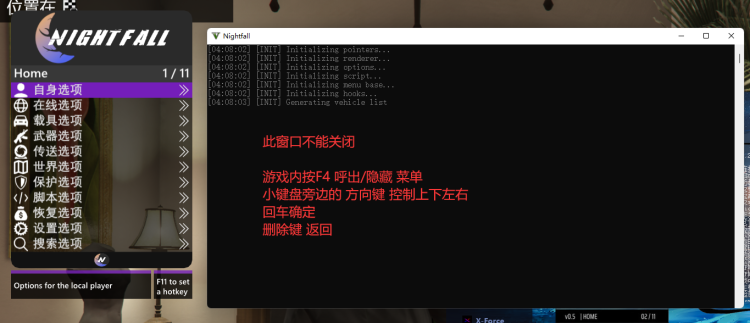
**注入成功后**
**`F4/*` 呼出/隐藏菜单**
**方向键`↑`** **`↓` 或者`8`** **`2` 控制上下**
**方向键`←`** **`→` 或者`4`** **`6` 控制左右**
**`回车键/Ent/5` 确定; `退格键/Back/0` 返回**
> **若注入时闪退尝试关闭加速器后再注入**
> {% endtab %}
{% tab title="官网启动器注入" %}
**进入****游戏故事后**
**将下载后的官网启动器****右键管理员**
**如图操作:**
{% endtab %}
{% endtabs %}
> **若注入时闪退尝试关闭加速器后再注入**
### 如若注入失败
> **查看以下教程,注入成功无视此条.**
{% embed url="" %}
## 使用
**注入成功后**
**`F4/*` 呼出/隐藏菜单**
**方向键`↑`** **`↓` 或者`8`** **`2` 控制上下**
**方向键`←`** **`→` 或者`4`** **`6` 控制左右**
**`回车键/Ent/5` 确定; `退格键/Back/0` 返回**