# KM使用教程

## 下载

[<mark style="color:blue;">**点击下载KM登录器**</mark>](https://shark.lanzouw.com/b011x91ij)

{% embed url="<https://shark.lanzouw.com/b011x91ij>" %}

**下载解压后**

**进入游戏故事模式**

![](/files/GTy9395vxR1KOFP0OeX6)

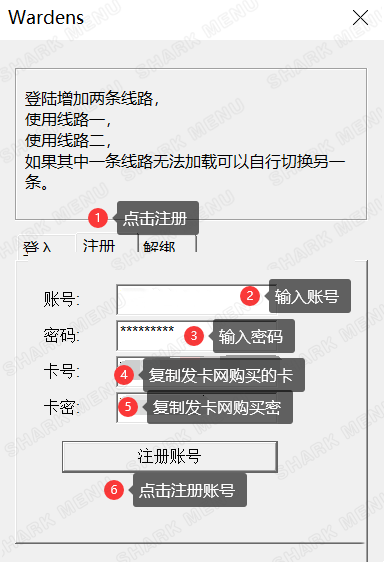
**打开注入器后如下图操作：**

{% hint style="danger" %} <mark style="color:red;">**注册的时候不能有中文跟特殊字符，不然会注册/注入不了**</mark>
{% endhint %}

<div align="left"><img src="/files/2yUowCuzxIFlGgsdBx9S" alt=""></div>

<div align="left"><img src="/files/rtyeOMuOVDSkqqPMihcN" alt=""></div>

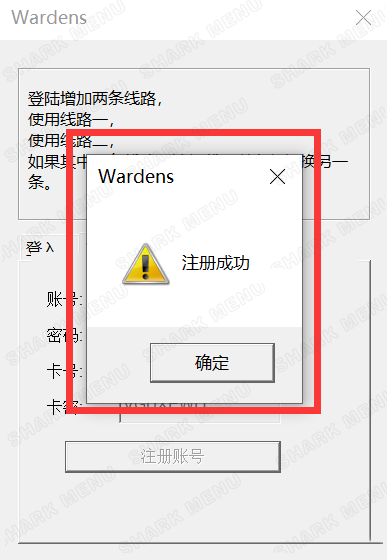
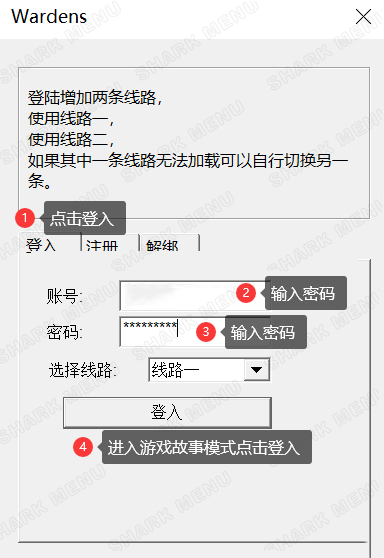
<mark style="color:red;">**提示注册成功后继续查看下图操作：**</mark>

<div align="left"><img src="/files/UP0ZnTHjxC6C6BblQ5bf" alt=""></div>

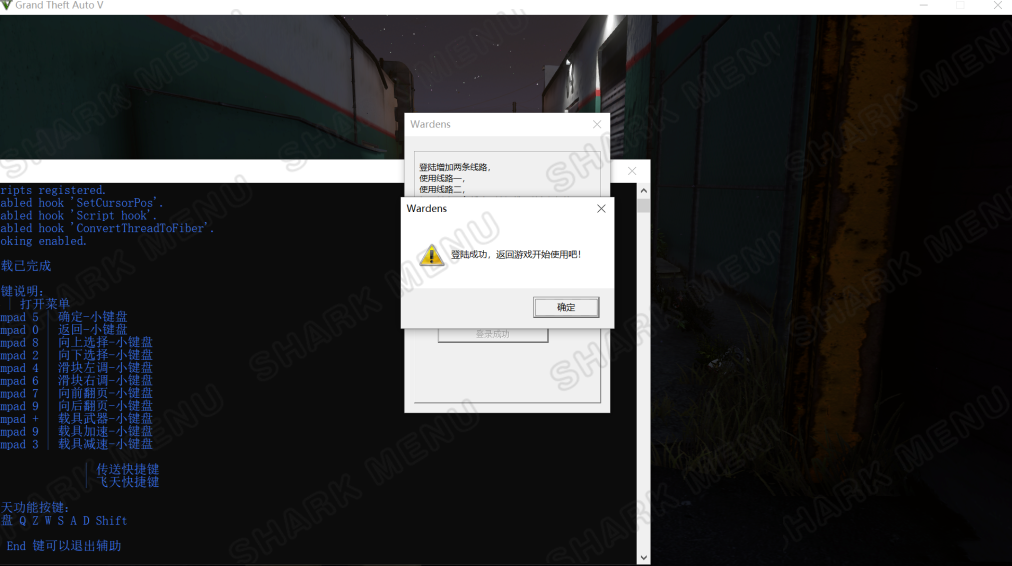
<mark style="color:red;">**出现黑框代表注入成功**</mark>

<div align="left"><img src="/files/dpFqLw8qp4Hk0erlK27L" alt=""></div>

## **使用**

**`F8/F4` 呼出/隐藏菜单**

**方向键`↑`** **`↓` 或者`8`** **`2` 控制上下**

**方向键`←`** **`→` 或者`4`** **`6` 控制左右**

**`回车键/Ent/小键盘5` 确定； `退格键/Back/小键盘0` 返回**

<mark style="color:red;">**文件夹内还有以及修改配置的其他教程，感兴趣的可以自行研究琢磨**</mark>

![](/files/yLk9jEXV21rHLIut7a5z)


---

# Agent Instructions: Querying This Documentation

If you need additional information that is not directly available in this page, you can query the documentation dynamically by asking a question.

Perform an HTTP GET request on the current page URL with the `ask` query parameter:

```
GET https://docs.shark.top/gtav/exit/menu/km/use.md?ask=<question>
```

The question should be specific, self-contained, and written in natural language.
The response will contain a direct answer to the question and relevant excerpts and sources from the documentation.

Use this mechanism when the answer is not explicitly present in the current page, you need clarification or additional context, or you want to retrieve related documentation sections.