# 开拓者设置主题教程

[<mark style="color:blue;">**点击下载开拓者主题**</mark>](https://shark.lanzouw.com/b011x92zc)

{% embed url="<https://shark.lanzouw.com/b011x92zc>" %}

{% hint style="success" %}
**解压后**

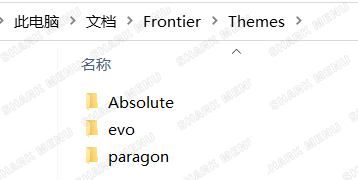
**放到此目录**

**C盘 我的文档&#x20;**<mark style="color:blue;">**Frontier**</mark>**文件夹&#x20;**<mark style="color:blue;">**Themes**</mark>**内**

{% hint style="danger" %}
**不是解压缩之后的文件放在Themes**

**是解压缩之后的文件夹 放在 Themes**
{% endhint %}
{% endhint %}

<div align="center"><img src="/files/Vh3iMJPcUe1u9QgmhPyM" alt=""></div>

{% hint style="info" %}
**游戏内设置：**

**F4呼出菜单**

**1 菜单设置**

**2 主题设置**

**3 选择主题列表下的主题文件夹名称 点击回车或者5 加载即可**
{% endhint %}

---

# Agent Instructions: Querying This Documentation

If you need additional information that is not directly available in this page, you can query the documentation dynamically by asking a question.

Perform an HTTP GET request on the current page URL with the `ask` query parameter:

```
GET https://docs.shark.top/gtav/exit/menu/frontier/theme.md?ask=<question>
```

The question should be specific, self-contained, and written in natural language.
The response will contain a direct answer to the question and relevant excerpts and sources from the documentation.

Use this mechanism when the answer is not explicitly present in the current page, you need clarification or additional context, or you want to retrieve related documentation sections.
