> For the complete documentation index, see [llms.txt](https://docs.shark.top/llms.txt). Markdown versions of documentation pages are available by appending `.md` to page URLs; this page is available as [Markdown](https://docs.shark.top/g/finals/exit/dullwave/use.md).
# DullWave使用教程
 ## 注入前设置
{% hint style="danger" %} **电脑设置:**
**仅适用于 Windows 10**** *****\[1903、1909、2004、20 H1、20 H2、21 H1、21H2]***
**确保卸载电脑里的所有****`杀毒`****软件(**~~**电脑管家 360 鲁大师**~~** ****等等)**
**确保关闭电脑里的****`自带杀毒`**
**确保卸载**** ****`Faceit反作弊`**** ****和**** ****`瓦洛兰特反作弊`**
**`关闭内核隔离`**
**`关闭快速重启`**
**游戏设置:**
**建议在全屏游戏模式下使用**
{% endhint %}
{% embed url="" %}
{% content-ref url="/pages/k6ufuNANt9OQOicWIJ25" %}
[关闭快速启动](/misc/win/off.md)
{% endcontent-ref %}
{% content-ref url="/pages/Z5DrxyW5B7GTIDROnvjr" %}
[关闭Win10/Win11病毒防护教程](/misc/win/antivirus.md)
{% endcontent-ref %}
## 下载
{% embed url="" %}
## 加速器
> **禁止使用免费加速器**
>
> **雷神/薄荷/鲜牛****等加速器还有所谓的`**加速器盒子`自行尝试,不行就换下列加速器**
>
> > **UU加速 `路由模式/模式3`**
> >
> > **迅游加速器 `模式3`**
> >
> > **奇游加速器**
> >
> > **3A加速器 `加速瓦洛兰特 全区服模式`**
>
> ***尝试更换加速器 更换加速器模式 更换加速器节点 直到能注入使用为止***
## **注入**
> **下载后`管理员运行`注入器,按照下图提示操作**
## 注入前设置
{% hint style="danger" %} **电脑设置:**
**仅适用于 Windows 10**** *****\[1903、1909、2004、20 H1、20 H2、21 H1、21H2]***
**确保卸载电脑里的所有****`杀毒`****软件(**~~**电脑管家 360 鲁大师**~~** ****等等)**
**确保关闭电脑里的****`自带杀毒`**
**确保卸载**** ****`Faceit反作弊`**** ****和**** ****`瓦洛兰特反作弊`**
**`关闭内核隔离`**
**`关闭快速重启`**
**游戏设置:**
**建议在全屏游戏模式下使用**
{% endhint %}
{% embed url="" %}
{% content-ref url="/pages/k6ufuNANt9OQOicWIJ25" %}
[关闭快速启动](/misc/win/off.md)
{% endcontent-ref %}
{% content-ref url="/pages/Z5DrxyW5B7GTIDROnvjr" %}
[关闭Win10/Win11病毒防护教程](/misc/win/antivirus.md)
{% endcontent-ref %}
## 下载
{% embed url="" %}
## 加速器
> **禁止使用免费加速器**
>
> **雷神/薄荷/鲜牛****等加速器还有所谓的`**加速器盒子`自行尝试,不行就换下列加速器**
>
> > **UU加速 `路由模式/模式3`**
> >
> > **迅游加速器 `模式3`**
> >
> > **奇游加速器**
> >
> > **3A加速器 `加速瓦洛兰特 全区服模式`**
>
> ***尝试更换加速器 更换加速器模式 更换加速器节点 直到能注入使用为止***
## **注入**
> **下载后`管理员运行`注入器,按照下图提示操作**
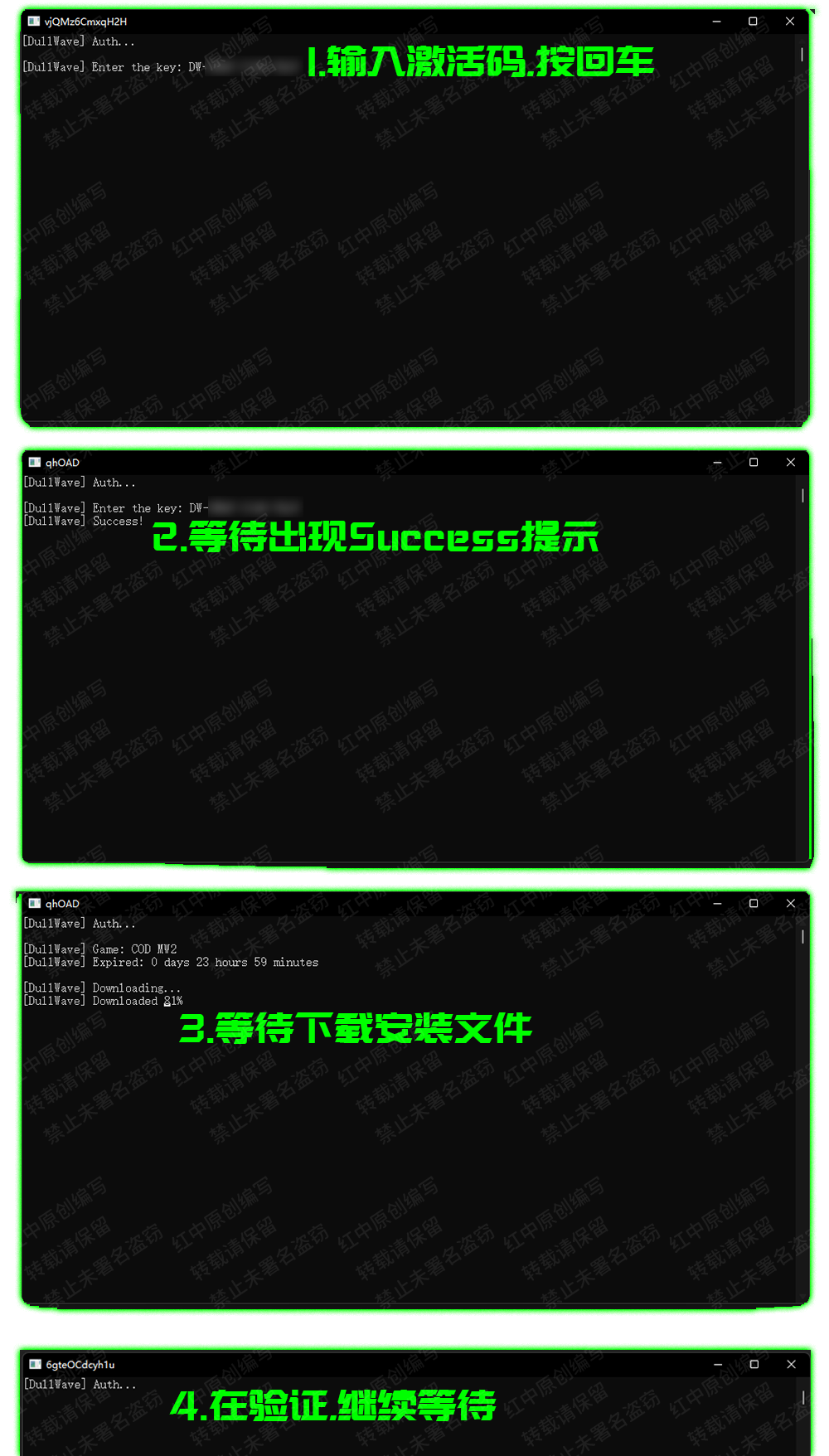 **等待验证后出现 ****`If game initialized - press any key to continue`****` ``.`这个提示后,进入游戏,在`游戏大厅内打开上方控制台`,然后按`回车`,然后`继续等待注入`,注入成功后`游戏内右上角`会出现****`DullWave`****字样,即代表`注入成功`**
## **使用**
**点击 `Home` 呼出/隐藏菜单**
**`鼠标点击` 操控菜单**
**`END` 退出菜单**
**等待验证后出现 ****`If game initialized - press any key to continue`****` ``.`这个提示后,进入游戏,在`游戏大厅内打开上方控制台`,然后按`回车`,然后`继续等待注入`,注入成功后`游戏内右上角`会出现****`DullWave`****字样,即代表`注入成功`**
## **使用**
**点击 `Home` 呼出/隐藏菜单**
**`鼠标点击` 操控菜单**
**`END` 退出菜单**