> For the complete documentation index, see [llms.txt](https://docs.shark.top/llms.txt). Markdown versions of documentation pages are available by appending `.md` to page URLs; this page is available as [Markdown](https://docs.shark.top/g/dxm/gf/faq.md).

# GF常见问题

**GF(诛仙)开启方法：**

**辅助类软件都因关闭杀毒 防护（GF老产品不存在病毒之类的问题，放心使用）**

**1.先开软件后进游戏（可）**

**2.游戏大厅打开软件注入（可）**

**3.游戏中打开软件注入（可）**

**以上三种开启方式都可以**

**ins隐藏菜单 end卸载软件**

**需管理员启动程序**

**每次软件注入后都会删除 下次注入重新解压即可**

***

**先尝试禁用游戏EAC**

<figure><img src="/files/8Pkcsu0obwyeEocl7QjN" alt=""><figcaption></figcaption></figure>

<figure><img src="/files/P0SahYOMLNUmTvrExpmw" alt=""><figcaption></figcaption></figure>

<figure><img src="/files/2gITflyKGVVwxarLkzSd" alt=""><figcaption></figcaption></figure>

<div data-full-width="false"><figure><img src="/files/SHrrI5JfOPZtTZqLQybS" alt=""><figcaption></figcaption></figure></div>

如果想恢复EAC把9改2就行！

***

**常见问题1:**

<figure><img src="/files/NAV2k51Uu8rssk6DZoG4" alt=""><figcaption></figcaption></figure>

**解决问题1:**

<figure><img src="/files/WWnBMXz99rRnEVVT8HH4" alt=""><figcaption></figcaption></figure>

***

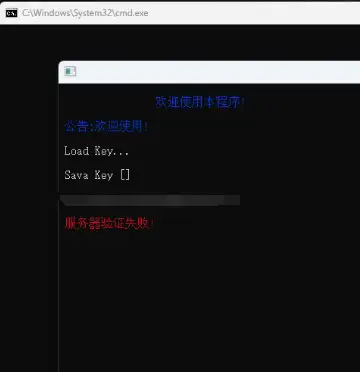
**常见问题2:**

<figure><img src="/files/vkh5uM4ppSGj1bF42few" alt=""><figcaption></figcaption></figure>

<figure><img src="/files/1WCKauIcqCODfhcoRYWL" alt=""><figcaption></figcaption></figure>

**解决问题2:**

**以上问题代表无法连接服务器**

**需要挂梯子或者爱加速（百度免费的）**

**或许换节点 路由模式等**

***

**常见问题3:**

<figure><img src="/files/oHMkgxEd9dbfuWSjzHtV" alt=""><figcaption></figcaption></figure>

**解决问题3:**

**一般电脑小白才会出现此问题**

**此问题是软件文件没有解压出来导致**

***

**常见问题4:**

**解压出来的主程序打开闪一下没了**

**解答问题4:**

**换其他盘解压即可，尽量英文盘**

***

**以上已经归类所有问题，后续会持续更新问题解决\~**