# DG使用教程

{% hint style="warning" %} <mark style="color:orange;">**电脑设置：**</mark>

<mark style="color:orange;">**注入前必须确保卸载你电脑的上**</mark><mark style="color:orange;">**`杀软软件`**</mark><mark style="color:orange;">**与**</mark><mark style="color:orange;">**`Win10`**</mark><mark style="color:orange;">**/**</mark><mark style="color:orange;">**`Win11`**</mark><mark style="color:orange;">**系统**</mark><mark style="color:orange;">**`自带杀毒`**</mark>

<mark style="color:orange;">**使用卸载软件删除**</mark><mark style="color:orange;">**&#x20;**</mark><mark style="color:orange;">**`FaceIT Anti-Cheat`**</mark><mark style="color:orange;">**&#x20;**</mark><mark style="color:orange;">**和**</mark><mark style="color:orange;">**&#x20;**</mark><mark style="color:orange;">**`Riot Vanguard(Valorant AC)`**</mark>

<mark style="color:orange;">**确保你拥有正版Windows,仅适用于 Windows 10/Win11**</mark><mark style="color:orange;">**&#x20;**</mark>*<mark style="color:orange;">**\[1903、1909、2004、20 H1、20 H2、21 H1、21H2]**</mark>*

<mark style="color:orange;">**游戏设置：**</mark>

<mark style="color:orange;">**视频-**</mark><mark style="color:orange;">**`窗口模式`**</mark><mark style="color:orange;">**/**</mark><mark style="color:orange;">**`无边框模式`**</mark>
{% endhint %}

## 下载

{% embed url="<https://dugucheat.com/premium>" %}

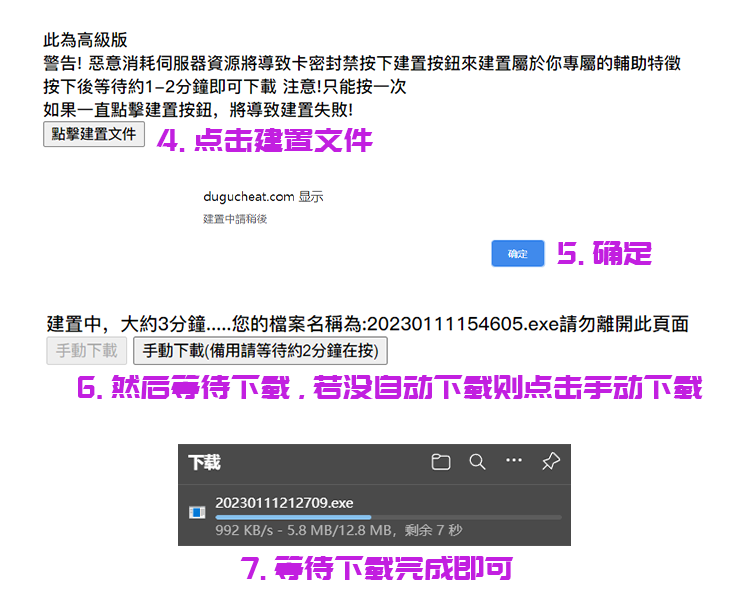
### 下载首次教学以及所需文件后需要安装一次驱动,然后再下载建置文件

<figure><img src="/files/rR1ITkbuU318pcAWrRZy" alt=""><figcaption></figcaption></figure>

<figure><img src="/files/7YHrSRL4mMoVsxfOpurd" alt=""><figcaption><p><strong>禁止短时间内去下载网站重复下载注入器,检测到会Ban卡</strong></p></figcaption></figure>

### **加速器**

> <mark style="color:blue;">**使用VPN或者以下加速器**</mark>
>
> <mark style="color:blue;">**禁止使用免费加速器**</mark>
>
> <mark style="color:blue;">**雷神/薄荷/鲜牛**</mark>**等加速器还有所谓的`**加速器盒子`自行尝试,不行就换下列加速器**
>
> > **UU加速 `路由模式/模式3`**
> >
> > **迅游加速器 `模式3`**
> >
> > **奇游加速器**
> >
> > **3A加速器 `加速瓦洛兰特 全区服模式`**
>
> *<mark style="color:purple;">**尝试更换加速器 更换加速器模式 更换加速器节点 直到能注入使用为止**</mark>*

{% embed url="<https://www.3ayx.net/act/invite/?inviter=j8M54x2qw7pgqTu8nOycCw==>" %}

## **注入**

> **开启**<mark style="color:red;">**`driver.vmp.exe`**</mark>**,然后运行**<mark style="color:red;">**`注入器登陆`**</mark>**,最后再**<mark style="color:red;">**`进入游戏`**</mark>

<figure><img src="/files/piv0v8rHEANzBF4wo4h3" alt=""><figcaption><p><strong>如若菜单一直显示驱动没载入好 重启电脑后再注入就可以了</strong></p></figcaption></figure>

## **使用**

**点击 `INS` 呼出/隐藏菜单**

&#x20;**`鼠标点击` 操控菜单**

**平滑度建议:`7~9`,开`1`会被Ban**

> **不要去竞技场的图玩,几率被Ban**

{% hint style="danger" %} <mark style="color:red;">**`如果你注入后功能失效,就是你没看教程,少了下载驱动的步骤...`**</mark>
{% endhint %}


---

# Agent Instructions: Querying This Documentation

If you need additional information that is not directly available in this page, you can query the documentation dynamically by asking a question.

Perform an HTTP GET request on the current page URL with the `ask` query parameter:

```
GET https://docs.shark.top/g/apex/exit/dg/use.md?ask=<question>
```

The question should be specific, self-contained, and written in natural language.
The response will contain a direct answer to the question and relevant excerpts and sources from the documentation.

Use this mechanism when the answer is not explicitly present in the current page, you need clarification or additional context, or you want to retrieve related documentation sections.